
To ensure you can easily reset your Office 365 password if you ever forget it, it’s important to set up your security verification methods in advance.
This guide walks you through configuring your recovery options, including adding a phone number, alternate email, and other backup methods.
| How to Set Up Security Questions in Office 365 for Password Recovery. Follow these steps to set up your security questions, which will allow you to reset your Office 365 password if you forget it: | |
| Step 1: Sign In to Office 365 1.Go to https://www.office.com. 2.Click Sign In. 3.Enter your Sprott Shaw College email address. 4.Enter your current password (either the one provided to you or the one you’ve changed it to). 5.Click Sign In again. | 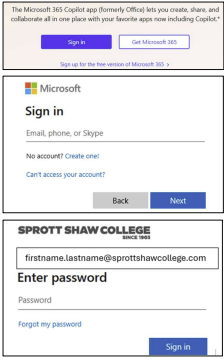 |
| Step 2: Access Your Security Settings 1. Click on your Account icon in the top right corner of the Office 365 homepage.  | |
| 2.Select “View Account” from the dropdown menu. 3.On the left-hand menu, click “Security info”. 4.Click the “Update Info” button. | 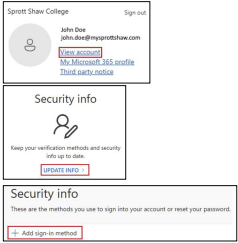 |
| Step 3: Add a Sign-In Method 1. Click “Add sign-in method.” 2.From the list of options, select at least two “sign-in-methods” Note: You can select any combination of “Sign-In” methods that you want. | 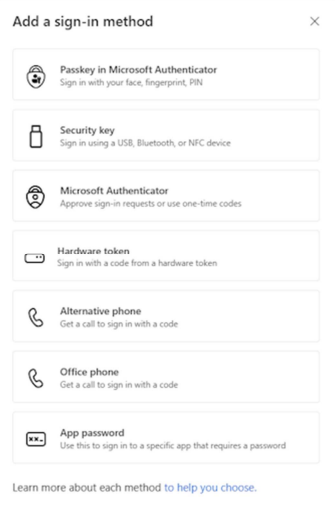 |
| 1. Click Next to complete the setup. | |
| How to Reset Your Forgotten Office 365 Password | |
| If you’ve forgotten your Office 365 password, follow these steps to securely reset it: Step 1: Start the Password Reset Process 1.Go to https://www.office.com. 2.Click on “Sign In.” 3.Below the password field, click“ Forgot my password.” | 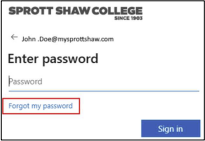 |
| Step 2: Verify Your Identity Enter your Sprott Shaw College email address (e.g., john.doe@mysprottshawcollege.com). 2.Type the characters shown in the image (this is a security check) 3.Click Next. Note: once your password has been updated, it can take up to 15min to propagate throughout our network. | 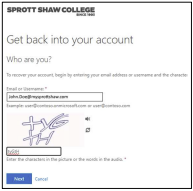 |